Copying nine HyperDecks while they're still recording
Picture nine Blackmagic HyperDeck Studio 4K Pros lined up in a rack at the back of a concert hall. Each one is recording a clean ISO of one camera. The show runs three hours. At the end of the night you eject eighteen SSDs, dock them one at a time over a USB-C card reader, and try not to mix up which clip came from which angle. By the time the last byte hits the NAS, the venue has been swept and the band is on the bus.
That was last year’s workflow. Not very glamorous.
This year I built a Mac app that does the whole thing over the network, in parallel, while the recording is still happening.
What HyperDeck has up its sleeve
The HyperDeck Studio range has a 10 GbE port on the back and most people use it for one thing: pushing the record/play buttons remotely from ATEM Software Control. What’s less obvious is that the same Ethernet stack exposes the recorder’s SSDs through three protocols at once:
- HTTPS — firmware 9.x ships a Web Media Manager with a JSON file API under
/mounts/. Recommended for live work. - FTP — older protocol, still on by default.
- SMB — the SSDs are mounted as
ssd1andssd2shares.
Any of those will read a finished clip just fine. The interesting question is what happens to a clip that the HyperDeck is still writing to.
The MXF live-copy trick
DNxHR SQ in an MXF OP1a container is a friendly format. The body of the file is just a long sequence of essence frames. The interesting metadata — partition packs, the Index Table, the Random Index Pack (RIP) that lets a player jump to any frame — only gets written at the end, when the recorder closes the file.
Which means you can read the body bytes while the recording is still going. Read what’s there, append, repeat. You’ll have a destination file that grows in step with the source. When the operator finally hits stop on the HyperDeck, the recorder writes the Footer Partition and the RIP, and the tool patches those last bits onto the end of the destination. The result is a fully closed, fully indexed MXF that opens cleanly in DaVinci Resolve a second after the recording stops. No second copy pass. No waiting for the recorder. No Media Offline gaps.
For MOV (ProRes), it’s not as friendly. QuickTime files keep their moov atom at the start or end of the file and rewrite it on close, so a partial copy mid-recording is unplayable. The tool deals with this honestly: in Live mode it queues MOV files and pulls them right after the recording stops, so they land complete and playable.
A few traps I didn’t see coming
A handful of things bit me on the way:
- macOS SMB read-ahead caches bytes the HyperDeck hasn’t written yet. When you read a growing file over SMB on a Mac, the kernel cheerfully prefetches past the current write head and hands you zeros or stale data. That punches Media Offline holes through the middle of an otherwise valid MXF. The fix was to route patch reads (footer, RIP, last-known good bytes) over HTTPS instead of SMB, where macOS doesn’t apply the same cache. SMB is fine for finished files.
- HyperDeck pre-allocates space ahead of the write head. The reported file size is bigger than the bytes you can actually trust. So the live-copy loop keeps a margin behind the reported size (256 MB for MXF) and only reads up to the safe zone, then waits.
- Hidden dotfiles. The HyperDeck silently writes a hidden
.RECORDING_NAME.movthat grows at about 1.5 kB/s — some kind of running index. FTP listings include hidden files. HTTPS doesn’t. SMB filters them. The tool used to think those were small live recordings and copied them once per scan, climbing to “42 done” in an evening when only three real clips existed. A one-line filter onis_videokilled it: anything starting with.is not a recording. - PyInstaller and aiohttp. Two libraries we depend on look up their own version with
importlib.metadata.version(...)at import time. PyInstaller bundles don’t include.dist-infodirectories by default, so the app crashed on first import.copy_metadata(...)in the spec file fixed it. - GUI updates can starve the network stack. A first attempt fired a Qt repaint on every megabyte of every recorder. With nine recorders pulling 300 MB/s each that’s 2,700 stylesheet reparses per second on the main thread. Throughput halved. Throttling UI pushes to 10 Hz, and caching the progress-bar stylesheet so it only re-applies on a status change, gave the network its CPU back.
None of these are exotic. They’re the boring middle of the iceberg under any tool that does sustained I/O.
How it looks
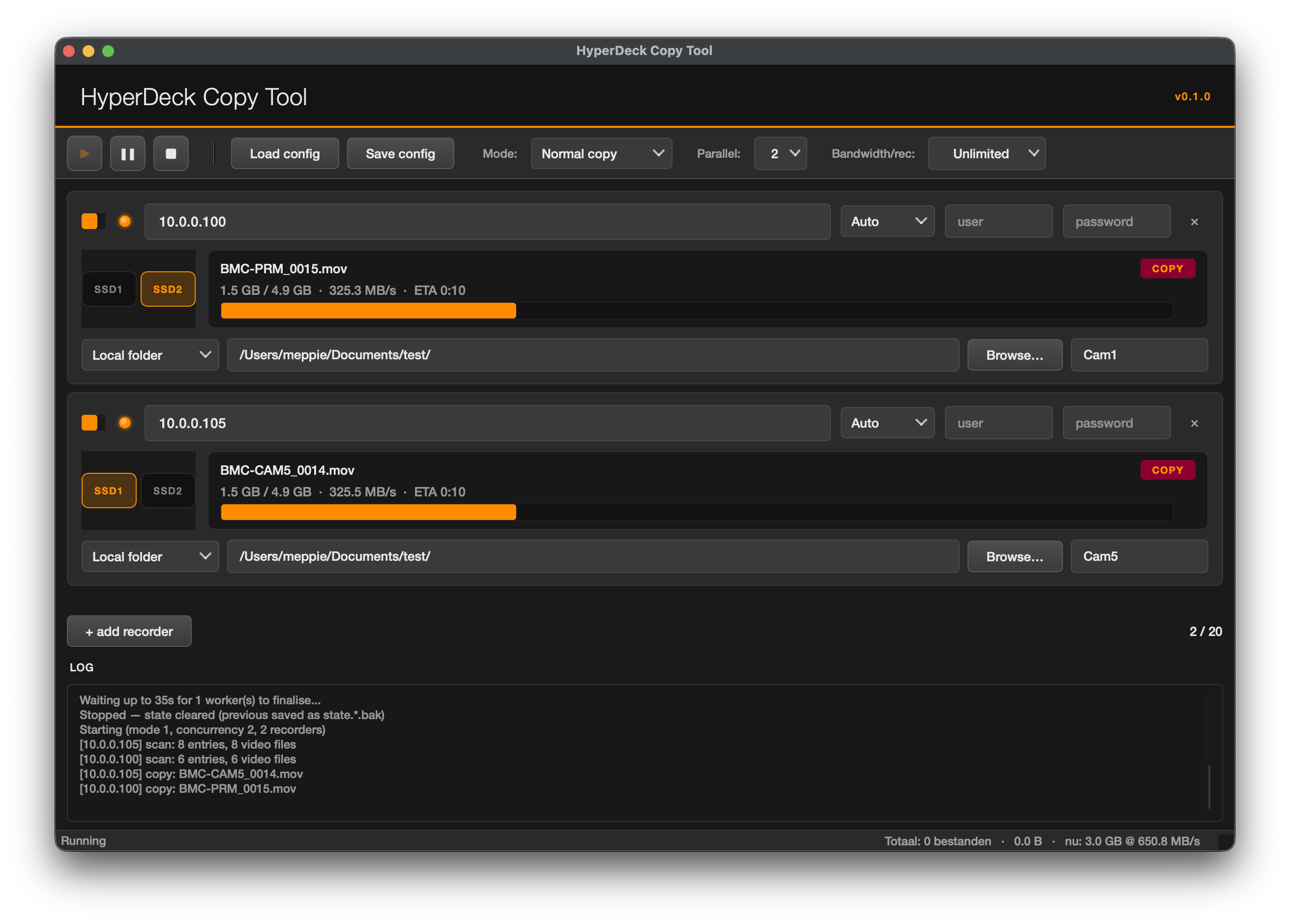
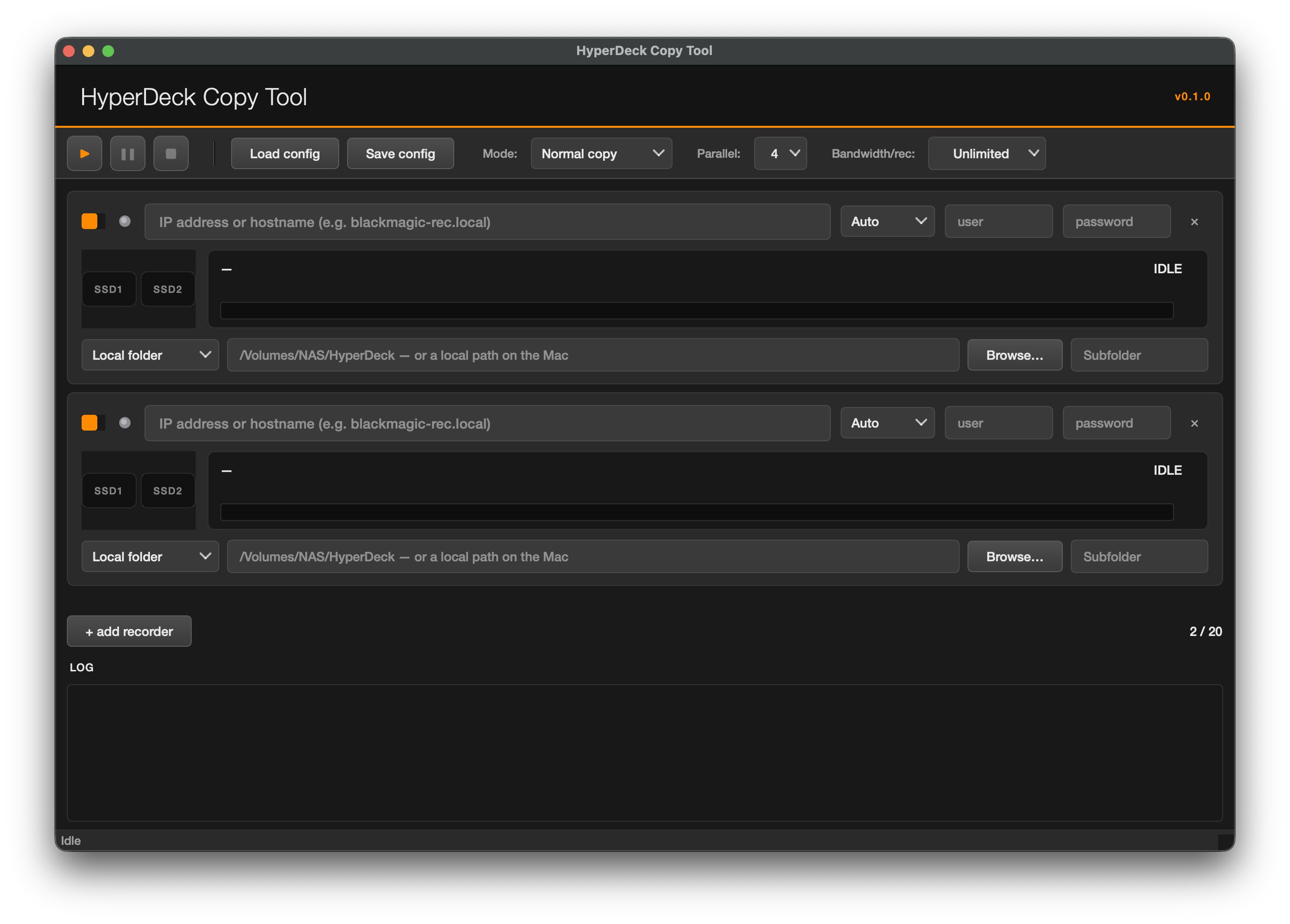
The UI is built in PyQt6 with the Blackmagic-style dark theme — Helvetica Neue Medium, orange accents, rounded-square controls. Each recorder row has a status LED, two SSD bay indicators that light up when that bay is being read from, a filename, throughput, ETA, and a per-recorder running tally.
Idle state, ready to be configured:
Mid-copy, two recorders pulling from different bays at ~325 MB/s each:
Twenty recorders fit on the list. Realistically you’ll hit your NAS or your switch before you saturate that many.
What’s inside the box
The release ships as a normal macOS DMG. Drag the app to Applications, right-click → Open the first time so Gatekeeper relaxes, and that’s it. No Python install on the target machine, no pip, no Terminal. A single 32 MB DMG that contains its own Python 3.12 runtime and PyQt6 frameworks.
Features I leaned on while building:
- Auto-protocol detection per recorder. Set it to Auto and the tool probes HTTPS, then FTP, then SMB, and uses the first one that returns a file listing. No need to know which protocol your firmware likes today.
- Per-recorder destinations and subfolders. Nine cameras can share one NAS path while still landing in
/Cam1/,/Cam2/, etc. - Resume-safe. Interrupt at any point and the next scan picks up from the destination size, not from zero. The tool never truncates a destination on a transient size mismatch.
- Pause-and-redirect. While paused you can change a recorder’s destination — handy when a NAS fills up halfway through and you need to swap to another volume.
- Per-recorder bandwidth cap. Default Ongelimiteerd, set a MB/s if you need to leave headroom for other traffic on the same 10 GbE link.
- UI follows the system language. Currently shipped: English and Dutch.
Get it
Source is private. The release pages, the README and the DMG live in a public companion repo:
github.com/Meppies/hyperdeck-copy-tool-releases
Tested on macOS 26 (Tahoe) Apple Silicon, HyperDeck Studio 4K Pro firmware 9.x, a 10 GbE switch and a Synology over SMB. Should work fine on macOS 11+ — that’s the deployment target — but I haven’t run it on Intel.
Two takeaways from this build, if you’re tempted to do something similar.
The first is that the protocol you pick for one job isn’t always the protocol you want for another. HTTPS is right for live capture because the macOS SMB layer fights you. SMB is right for finished bulk copies because aiohttp doesn’t always re-establish a connection quickly between clips. The tool ended up using both, side by side, in the same copy loop. Worth the complexity.
The second is that the boring stuff dominates. The MXF finalisation was a couple of hundred lines of careful byte-pushing. The GUI update throttling, the dotfile filter, the copy_metadata line in the PyInstaller spec, the size-truncate guard — those are the ones that decided whether the tool was usable or merely demoable.
Next on the list: code-signing and notarisation so the first-launch Gatekeeper dance goes away. Then a Windows build, because somebody will ask.
Thanks for reading. If you want more of this, follow along on GitHub or grab the RSS feed.